

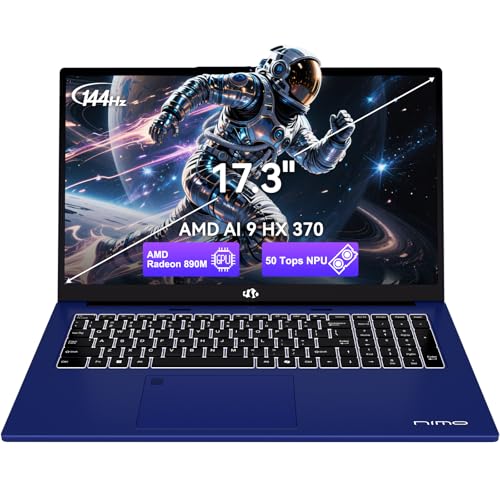
MSI Katana 15 (131264) vs NIMO N178 (ARN79)
Comparison summary
- MSI Katana 15 is hands-down better laptop for gaming but NIMO N178 is a better deal.
- For performance N178 has a lot better performing processor. It also offers more memory.
- Katana 15 comes with Windows 11 Pro and N178 with Windows.
- For graphics performance Katana 15 has a lot superior graphics card.
- N178 features a bigger display. Its also slimmer and smaller in size.
- N178 has a bigger SSD.


MSI Katana 15 (131264)
NIMO N178 (ARN79)
Compare specifications
| MSI Katana 15 (131264) | NIMO N178 (ARN79) |
|---|---|
| Processor (CPU)?Central Processing Unit is the heart of a laptop and is responsible for executing programs. Read more | |
| Intel Core i7-13620H | AMD Ryzen AI 9 HX 370 |
| Memory (RAM)?Memory increases the general speed and multiprocessing capabilities of a laptop. Read more | |
| 16gb | 32gb |
| Graphics card (GPU)?Graphics Processing Unit calculates 3D graphics and is essential for gaming and heavy programs. Read more | |
| GeForce RTX 4070 | Radeon 890M |
| Screen size | |
| 15.6″ | 17.3″ |
| Screen resolution | |
| Full HD (1920 x 1080 pixels) | Full HD (1920 x 1080 pixels) |
| Weight | |
| 4.96 lbs (2.25 kg) | 4.6 lbs (2.09 kg) |
| Size (length x width x height) | |
| 14.13 x 10.2 x 0.98 inches | 15.66 x 9.99 x 0.74 inches |
| (35.89 x 25.91 x 2.49 cm) | (39.78 x 25.37 x 1.88 cm) |
| Operating system (OS) | |
| Windows 11 Pro | Windows |
| Hard drives | |
| 1000gb SSD | 2200gb SSD |
| Release date | |
| February 3, 2024 | June 26, 2026 |
| Amazon.com List Price | |
| $1,499.99 | $1,299.98 |
| Amazon.com Lowest New Price | |
| $1,499.99 | $1,299.98 |
| Buy on Amazon.com Price updated 13 h agoOnly 1 new offer left | Buy on Amazon.com Price updated 15 h agoIn stock |
Laptop Dimensions
MSI Katana 15 (131264)
NIMO N178 (ARN79)
Compare MSI Katana 15 / NIMO N178 vs other gaming laptops:


MSI Katana 15 (131264) summary
MSI Katana 15 is an impressive value gaming laptop with Windows 11 Pro released in 2024. It has the GeForce RTX 4070 graphics card which is brilliant well-suited for gaming. You can play 80% of the games published this year on recommended settings. The laptop has a very good Intel CPU plus a decent amount of RAM for its price. Full HD resolution is ok for the 15-inch 144 Hz screen. The 1000gb SSD storage is adequate. It is quite heavy at 4.96 lbs (2.25 kg).
msi Katana 15 Laptop: Intel Core i7-13620H, GeForce RTX 4060, 15.6" FHD 144Hz, 16GB DDR5, 1TB NVMe SSD, USB 3.2 Gen1 Type C w/DP, Cooler Boost 5, Win 11 Pro: Black B13VFK-1264US
Supercharged Process: The 13th Gen. Intel Core i7 processor delivers the ultimate immersive experience in gameplay, multi-task work and productivity.
Power Your Passion: Intuitive navigation with faster performance, Windows 11 Pro is perfect for at home use or running a business.
Beyond Fast: The NVIDIA GeForce RTX 4070 GPU powered by the Ada architecture unleashes the full glory of ray tracing, which simulates how light behaves in the real world.
FHD Display: The 15.6" 16:9 144Hz display delivers fast refresh rate for better immersive experience.
Powerful Cooling: Cooler Boost 5 to ensure optimal thermal dissipation and provide the best gaming experience.
ASIN: B0C9FRSDBQ
NIMO N178 (ARN79) summary
NIMO N178 is a fine value Windows gaming laptop released in 2026. It has a brilliant AMD CPU plus plenty of RAM for its price. The laptop has the Radeon 890M graphics card which is weak great for gaming. You can run some games published this year using lower graphics settings, but you should check for games you want to play. Your 2200gb SSD storage is an outstanding amount. Full HD resolution is passable for the 17-inch 144 Hz monitor. It is light enough at 4.6 lbs (2.09 kg).
NIMO 17.3 AI Copilot+ Laptop, 12 Core AI 9 HX 370 32GB 5600MHz DDR5 1TB SSD | (12C/24T, 50 Tops NPU, Beat Ultra 9 285H Up to 5.1GHz) Radeon 890M, 144Hz FHD for Multi-tasking Creators & STEM 2-Yr Warranty
【12 Cores for Busy Workdays】The AMD Ryzen AI 9 HX 370 gives this laptop 12 cores and 24 threads, versus 8 cores and 16 threads on the Ryzen 7 7735HS. That adds processing resources for professionals juggling spreadsheets, browser tabs, video calls, and coding tools. More cores do not imply a proportional speed increase. Keep research, communication, and project tools together in one workspace, whether you are reviewing a report during a meeting or working through a development task.
【Radeon 890M for Work and Visual Projects】AMD Radeon 890M integrated graphics support a mix of everyday productivity, photo editing, and video viewing. Move from preparing presentation visuals to organizing photos or watching a movie on the same laptop. Graphics performance varies with memory configuration, software, and power settings. For students and home creators, this makes it convenient to combine class presentations, personal photo projects, and everyday entertainment in one computer.
【Room for 32GB RAM and 1TB SSD】Two DDR5 SO-DIMM slots support up to 64GB at 5600MHz, while two M.2 2280 PCIe 4.0 x4 SSD slots leave room for growing project folders, course materials, and work files. Plan future upgrades as your needs expand. Supported capacity is not the amount of RAM or storage included. Students and professionals can plan separate drives for applications and project files, with expansion options that help accommodate larger libraries without replacing the entire laptop.
【17.3 Inch Display for Desk Work】A 17.3 inch 16:9 screen gives documents, spreadsheets, and online lessons a larger physical viewing area. For students and home office users, it makes reference material and editing windows easier to view side by side, with more screen space for everyday reading and work. Read a source document while drafting a report, follow a lesson while taking notes, or compare information across windows with less need to keep switching between full-screen views.
【US Assembly and Warranty Support】This laptop includes warranty support, final assembly in the United States, and after-sales replacement handled in the United States. For school, home office, and everyday work, US-based support provides a clear point of contact when product assistance or replacement is needed. Whether used for assignments, household tasks, or business documents, knowing where assembly and replacement are handled makes the support arrangement easier to understand.
【58Wh Battery and 100W PD Charging】A 58Wh lithium-polymer battery pairs with a 100W PD adapter for moving between desk work and time away from an outlet. Both the USB4 port and the additional USB-C port support PD charging, giving home and office users convenient USB-C power connections. Move from a home office to a meeting space and reconnect through a supported charging port. The included adapter gives you a defined power setup for everyday use without choosing a separate charger.
【Backlit Keyboard for Evening Tasks】The backlit US keyboard helps you see the keys in dim rooms, whether you are finishing an assignment, writing work notes, or replying to email in the evening. Clearer key visibility helps reduce interruptions caused by searching for keys in low light. For students and remote workers sharing a room, illuminated keys make it easier to find letters and shortcuts when the surroundings are dark, so you can focus on the next sentence or task.
【Ports for Your Everyday Setup】Connect a monitor, mouse, external storage, and media cards using one USB4 port, one additional USB-C port, HDMI, three USB-A ports, an SD card reader, and a 3.5 mm combo audio jack. Direct connections help students and office users set up common peripherals with fewer adapters. Import photos from an SD card, attach a wired headset for a call, or connect a USB drive to exchange files. The port selection suits both a regular desk setup and temporary workspaces.
【Fingerprint Sign-In for Daily Convenience】A fingerprint reader integrated into the touchpad lets you sign in with a touch after setup, reducing repeated password entry. It is useful when returning to a locked laptop between classes, home office tasks, or sessions at a shared desk. After stepping away for a break or moving to your next task, unlock the computer through the reader built into the touchpad area. It keeps a frequently used sign-in option close to your normal working position.
【Camera Privacy You Can See】The 2MP front camera includes a physical privacy shutter, so you can cover the lens after a video meeting or online class. For use in bedrooms, dorms, or shared family spaces, the shutter provides a visible way to block the camera without adding a separate sticker. Open the shutter when you are ready to join a call, then close it when the session ends. This simple physical control makes it easier to manage camera coverage as your room shifts from work to personal use.
ASIN: B0H6P45MST