Find the best laptops for Battle of Empires : 1914-1918

Best Laptops for Battle of Empires : 1914-1918

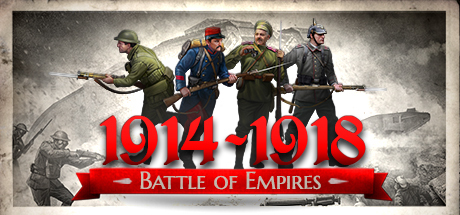
Battle of Empires : 1914-1918 is an indie strategy game developed by Great War Team and published by by Best Way Soft released in 2015. Battle of Empires: 1914-1918 is a story-driven RTS that brings to life some of the most brutal battles of the Great War. Each mission showcases the era’s most devastating weaponry — sabotage, stealth, trench warfare, gas attacks, artillery, and mobile infantry. BoE delivers the full WWI experience.

Laptop Requirements for Battle of Empires : 1914-1918

The system requirements are modest, but its recommended to have a dedicated graphics processing unit for successfully playing Battle of Empires : 1914-1918. GeForce GTX 960M or better mobile GPU is required.

8gb RAM requirement is easily covered, though 2gb is enough to meet the minimum requirements.

Windows System Requirements

Minimum:
  • Operating System: Windows XP SP3
  • Processor: 2 GHz Intel Dual Core processor
  • Memory (RAM): 2 GB RAM
  • Graphics Processing Unit: 3D Hardware Accelerator Card Required – 100% DirectX 9.0c compatible 128 MB Video Memory. ATI® Radeon® 9600 or Nvidia® GeForce® 5900
  • Storage space: 6 GB available space
Recommended:
  • Operating System: Windows 7 or Windows 8
  • Processor: 3 GHz Intel Quad Core processor
  • Memory (RAM): 8 GB RAM
  • Graphics Processing Unit: NVIDIA GeForce GTX 560 or AMD Radeon HD 7750 with 1 GB VRAM or better
  • Storage space: 6 GB available space

Best Windows Laptops for Battle of Empires : 1914-1918

These laptops meet the recommended system requirements and let you enjoy the game on high graphics settings without lag and stutter.

16″
HP OmniBook 3 16″
HP OmniBook 3 16″
D5AU3UAABA
Popular2026 modelTrusted brand16 GB RAMThinTouchscreen
$901.49
17″
HP OmniBook 3 17″
HP OmniBook 3 17″
OmniBook
Popular2026 modelTrusted brand16 GB RAMThinTouchscreen
$888.99
ACEMAGIC Mini
ACEMAGIC Mini
M5
2026 model16 GB RAMLightweightAMD CPUHigh resolution
$679.99
$611.99
13″
ASUS ROG Flow Z13
ASUS ROG Flow Z13
Runs 80% of new games on recommended 8060S GPU2026 model64 GB RAMThin2-in-1 laptop
$2,689.95
14″
HP OmniBook 14″
HP OmniBook 14″
14-fm
2026 modelTrusted brand16 GB RAMThin2-in-1 laptopTouchscreen
$911.98
16″
Acer Nitro V 16″
Acer Nitro V 16″
Runs 50% of new games on recommended RTX 5050 GPU2026 model32 GB RAMIPS screen
$1,789.99
16″
Acer Nitro V 16″
Acer Nitro V 16″
Runs 70% of new games on recommended RTX 5060 GPU2026 model32 GB RAMIPS screen
$2,059.95
16″
Acer Nitro V 16″
Acer Nitro V 16″
Runs 70% of new games on recommended RTX 5060 GPU2026 model32 GB RAMIPS screen
$1,919.95
16″
ASUS ROG Strix G16
ASUS ROG Strix G16
Runs 70% of new games on recommended RTX 5060 GPU2026 model16 GB RAMi7 CPU
$1,729.62
16″
ASUS ROG Strix G16
ASUS ROG Strix G16
G615JMR-AS74
Runs 70% of new games on recommended RTX 5060 GPU2025 model16 GB RAMi7 CPU
$1,629.63
16″
Dell 16 Plus
Dell 16 Plus
16
2026 modelTrusted brand16 GB RAMThin2-in-1 laptopTouchscreen
$1,059.99
16″
Lenovo IdeaPad 5 2-in-1 16″
2026 modelTrusted brand16 GB RAMThin2-in-1 laptopAMD CPU
$1,039.95
Filter with Laptop Finder

Budget Windows Laptops for Battle of Empires : 1914-1918

These cheaper options meet the minimum system requirements stated by the developer. You may need to lower the graphics settings or the in-game resolution to run the game smoothly.

15″
Dell LDC15250-3883BLK-PUS
Y3VGT
Trusted brand8 GB RAMThinIPS screenBudget choice
$469.97
17″
HP OmniBook 3 17″
HP OmniBook 3 17″
D5SQ3UAABA
2026 modelTrusted brand8 GB RAMThinAMD CPUIPS screen
$516.88
16″
HP OmniBook 3 16″
HP OmniBook 3 16″
D57E9UAABA
2026 modelTrusted brand8 GB RAMThinTouchscreenAMD CPU
$592.89
14″
HP Stream 14″
HP Stream 14″
2026 modelTrusted brand16 GB RAMSD card readerBudget choice
$449.00
15″
Lenovo V15
Lenovo V15
ThinkPad E16
2025 modelTrusted brand16 GB RAMAMD CPU
$599.98
15″
Acer Aspire 3 15″
Acer Aspire 3 15″
82C7008KMH
2026 model16 GB RAMThinTouchscreenAMD CPUIPS screen
$699.99
$589.97
Filter with Laptop Finder

Mac System Requirements

Recommended:
  • Operating System: Intel Mac, OS X version 10.11 (El Capitan)
  • Processor: Intel Core i7-2.2GHz
  • Memory (RAM): 8 GB RAM
  • Graphics Processing Unit: Intel Iris Pro or NVidia GeForce GTX 750M
  • Storage space: 6 GB available space

Recommended Macbooks for Battle of Empires : 1914-1918

These laptops meet the system requirements stated by the developer. Macbooks with M1 or M2 CPU may require Rosetta 2 to run the game.

16″
Apple MacBook Pro 16” (2021)
MK193LL/A
Trusted brand16 GB RAMThinHigh resolution
$2,699.00
16″
Apple MacBook Pro 16” (2021)
Trusted brand16 GB RAMThinHigh resolution
$2,499.00
14″
Apple MacBook Pro 14” (2021)
MKGT3LL/A
Trusted brand16 GB RAMThinHigh resolution
$2,499.00
Filter with Laptop Finder
These recommendations are based on technical details and requirements. We can't guarantee that the game will run on every laptop.