
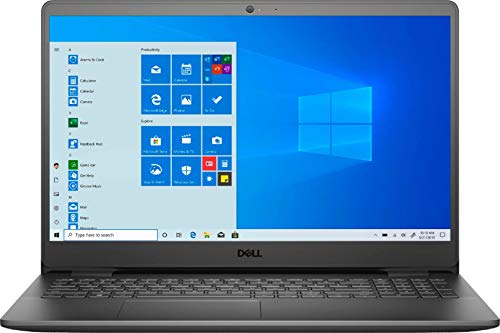
Dell Inspiron 15″ (3505)
Laptop summary
Dell Inspiron is a Windows touchscreen laptop. It doesn't have the best AMD CPU, though enough memory for its price. The laptop is quite heavy at 4.4 lbs (2 kg). Full HD resolution is ok for the 15-inch monitor. The 250gb SSD storage is average.
Compare Dell Inspiron 15″ vs other touchscreen laptops:





Dell Inspiron 15″ (3505)
Specifications
| Dell Inspiron 15″ (3505) |
|---|
| Processor (CPU)?Central Processing Unit is the heart of a laptop and is responsible for executing programs. Read more |
| AMD Ryzen 5 3450U |
| Memory (RAM)?Memory increases the general speed and multiprocessing capabilities of a laptop. Read more |
| 8gb |
| Graphics card (GPU)?Graphics Processing Unit calculates 3D graphics and is essential for gaming and heavy programs. Read more |
| Radeon Vega 8 Mobile |
| Screen size |
| 15.6″ |
| Screen resolution |
| Full HD (1920 x 1080 pixels) |
| Weight |
| 4.4 lbs (2 kg) |
| Size (length x width x height) |
| 14.33 x 9.8 x 0.71 inches |
| (36.4 x 24.89 x 1.8 cm) |
| Operating system (OS) |
| Windows 10 Home |
| Hard drives |
| 250gb SSD |
| Release date |
| August 18, 2021 |
| Amazon.com List Price |
| $422.99 |
| Amazon.com Lowest New Price |
| $422.99 |
| Buy on Amazon.com Price updated 20 h agoIn stock |
Laptop Dimensions
Dell Inspiron 15″ (3505)
Dell Inspiron 15″ (3505) summary
Dell 2021 Inspiron 15.6" FHD Touchscreen Laptop, AMD Ryzen 5-3450U, 8GB RAM Memory, 256GB PCIe SSD, AMD Radeon Vega 8 Graphics, Webcam, Bluetooth, Wi-Fi, HDMI, Windows 10 in S Mode
15.6" 1920 x 1080 (Full HD) Anti-Glare LED-Backlit Touchscreen Display, You' ll get superior image quality and razor-sharp resolution with everything you view, from work to play
AMD Ryzen 5 3450U Mobile Processor. Enjoy high application performance and smoother gaming experiences with AMD Ryzen 5 processors, with machine intelligence, multitasking capabilities and efficient architecture with up to 4 cores and 8 processing
8GB system memory Reams of high-bandwidth RAM to smoothly run your graphics-heavy PC games and video-editing applications, as well as numerous programs and browser tabs all at once.
256GB M.2 PCIe NVMe Solid State Drive While offering less storage space than a hard drive, a flash-based SSD has no moving parts, resulting in faster start-up times and data access, no noise, and reduced heat production and power draw on the battery.
Windows 10 Home in S mod You may switch to regular windows 10: Press "Start button" bottom left of the screen; Select "Settings" icon above "power" icon;Select Update & Security and Activation, then Go to Store; Select "Get" option under "Switch out of S mode"; Hit Install. (If you also see an "Upgrade your edition of Windows" section, be careful not to click the "Go to the Store" link that appears there.)
ASIN: B094L3BYRP