
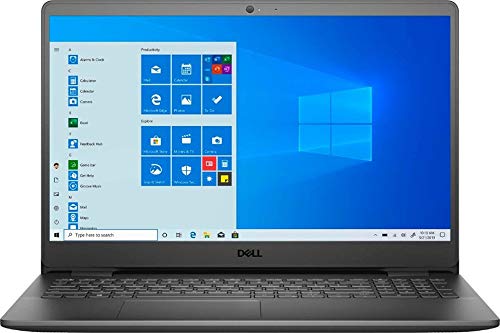
Dell Inspiron 15 3000 (Inspiron 15 3000)
Laptop summary
Dell Inspiron 15 3000 is a Windows touchscreen laptop. It doesn't have the best AMD processor, though enough RAM for its price. The laptop is quite heavy at 4.1 lbs (1.86 kg). Full HD resolution is ok for the 15″ monitor. The 250gb SSD storage is typical.
Compare Dell Inspiron 15 3000 vs other touchscreen laptops:


Dell Inspiron 15 3000 (Inspiron 15 3000)
Specifications
| Dell Inspiron 15 3000 (Inspiron 15 3000) |
|---|
| Processor (CPU)?Central Processing Unit is the heart of a laptop and is responsible for executing programs. Read more |
| AMD Ryzen 5 3450U |
| Memory (RAM)?Memory increases the general speed and multiprocessing capabilities of a laptop. Read more |
| 8gb |
| Graphics card (GPU)?Graphics Processing Unit calculates 3D graphics and is essential for gaming and heavy programs. Read more |
| Radeon Vega 8 Mobile |
| Screen size |
| 15.6″ |
| Screen resolution |
| Full HD (1920 x 1080 pixels) |
| Weight |
| 4.1 lbs (1.86 kg) |
| Size (length x width x height) |
| 14.33 x 9.8 x 0.71 inches |
| (36.4 x 24.89 x 1.8 cm) |
| Operating system (OS) |
| Windows 10 Home |
| Hard drives |
| 250gb SSD |
| Release date |
| November 4, 2021 |
| Amazon.com List Price |
| $499.99 |
| Amazon.com Lowest New Price |
| $499.99 |
| Buy on Amazon.com |
Laptop Dimensions
Dell Inspiron 15 3000 (Inspiron 15 3000)
Dell Inspiron 15 3000 (Inspiron 15 3000) summary
Dell Inspiron 15 3000 15.6" FHD LED-Backlit Touchscreen Laptop, AMD Ryzen 5 3450U up to 3.5GHz, 8GB DDR4, 256GB SSD, HDMI, Wi-Fi, Bluetooth, Webcam, Windows 10 Home S
15.6" FHD Energy-efficient LED-backlit (1920 x 1080) Touch Display, AMD Ryzen 5 3450U up to 3.5GHz, AMD Radeon Vega 8 Graphics.
8GB high-bandwidth RAM to smoothly run multiple applications and browser tabs all at once; 256GB SSD allows fast bootup and data transfer.
1x USB 2.0 port, 2x USB 3.2 Gen 1 ports, 1x Headset (headphone and microphone combo) port, 1x RJ45 - 10/100Mbps Ethernet port, 1x HDMI 1.4 port, 1x Power-adapter port, 1 x TWE Mouse Pad
Stay focused on tasks by interacting with your phone directly from your Dell PC– you can easily make calls, send texts, and get notifications.
Leverage the best of Windows 10, with a new update packed with exciting features. You may switch to regular windows 10: Press "Start button" bottom left of the screen; Select "Settings" icon above "power" icon; Select Update & Security and Activation, then Go to Store; Select "Get" option under "Switch out of S mode"; Hit Install. (If you also see an "Upgrade your edition of Windows" section, be careful not to click the "Go to the Store" link that appears there.
ASIN: B09985Z7DR