
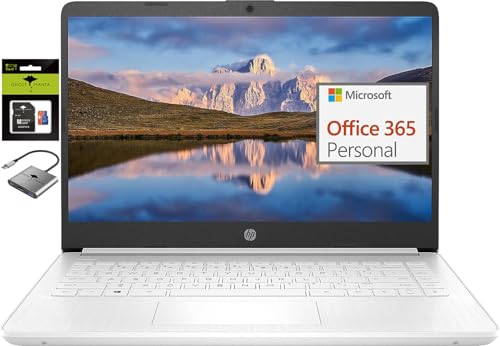
HP 14 HD
Laptop summary
HP 14 HD is a decent value Windows laptop released in 2025. It has an okay Intel CPU, however lots of RAM for its price. HD resolution is okay for the 14-inch display. Your 64gb SSD storage is rather limited.
Compare HP 14 HD vs other budget laptops:


HP 14 HD
Specifications
| HP 14 HD |
|---|
| Processor (CPU)?Central Processing Unit is the heart of a laptop and is responsible for executing programs. Read more |
| Intel Celeron N4120 |
| Memory (RAM)?Memory increases the general speed and multiprocessing capabilities of a laptop. Read more |
| 16gb |
| Screen size |
| 14″ |
| Screen resolution |
| HD (1366 x 768 pixels) |
| Size (length x width x height) |
| 12.76 x 8.86 x 0.71 inches |
| (32.41 x 22.5 x 1.8 cm) |
| Operating system (OS) |
| Windows 11 Home |
| Hard drives |
| 64gb SSD |
| Release date |
| July 16, 2025 |
| Amazon.com List Price |
| $378.88 |
| Amazon.com Lowest New Price |
| $378.88 |
| Buy on Amazon.com |
Laptop Dimensions
HP 14 HD
HP 14 HD summary
HP 14 Premium HD Portable Laptop Computer Students Business, Quad-Core Intel Celeron Processor, 16GB RAM, 320GB Storage(64GB eMMC+256GB Ghost Manta SD Card), 1 Year Office 365, HDMI, Win 11
【14-inch HD Screen Laptop】HP 14" Laptop with HD, micro-edge, BrightView display. Enjoy an immersive multimedia experience with a slim bezel design and maximized viewing area. HP True Vision 720p HD webcam with integrated dual-array digital microphones keeps video chats crystal clear, even in low-light conditions.
【Intel Celeron N4120 Processor】Powered by an Intel processor, 4 Core performance delivers seamless multi-monitor setups. With an ultra-sensitive precision touchpad, you can browse the web, study, work and do more anytime with up to 11 hours of battery life, you can easily power through a full day of work and play.
【Upgraded to 16GB RAM & 64GB eMMC+ 256GB Ghost Manta SD cards】Adequate high-bandwidth RAM to smoothly run multiple applications and browser tabs all at once. Massive storage space for your files, applications,providing fast and reliable data access.
【Windows 11 Home in S mode】You may switch to regular windows 11: Press "Start button" bottom left of the screen; Select "Settings" icon above "power" icon;Select "Activation", then Go to Store; Select Get option under "Switch out of S mode"; Hit Install. (If you also see an "Upgrade your edition of Windows" section, be careful not to click the "Go to the Store" link that appears there.)
Activate pre-installed Office 365: 1.Launch any Office app > 2.Start your activation by signing in with your Microsoft account(Create a account if you don't have one yet) > 3.Click "Activative Office" > 4.Sign in your account and follow the next prompts. > 5.Complete Step 1,2 and 3 > 6.Click on Refresh once Office is ready > 7.Open a document and accept the license agreement.
ASIN: B0FDR4KTWB